Signing in only unlocks backup and moving projects between devices. The app itself needs no account.
BUILD COMFORTABLY ALL IN ONE WORKSPACE.
One tool for the whole job, from the project trailer to the field. Track schedules, budget lines, and field reality on one screen, without the software headache. Local-first, offline-ready, and 100% your data.
One workspace for the people who carry the job, from the project trailer to the field to the final walkthrough.
General ContractorsWhole-project control, one screen
Project ManagersSchedules, budgets & reports that stay in sync
SuperintendentsDaily work, weather, and field reality
Sub & Trade LeadsClear roles, RACI, and handoffs
Everything a real project needs
Eighteen panels, wired together. Enter a number once and it shows up everywhere it matters. No re-entry, no drift.
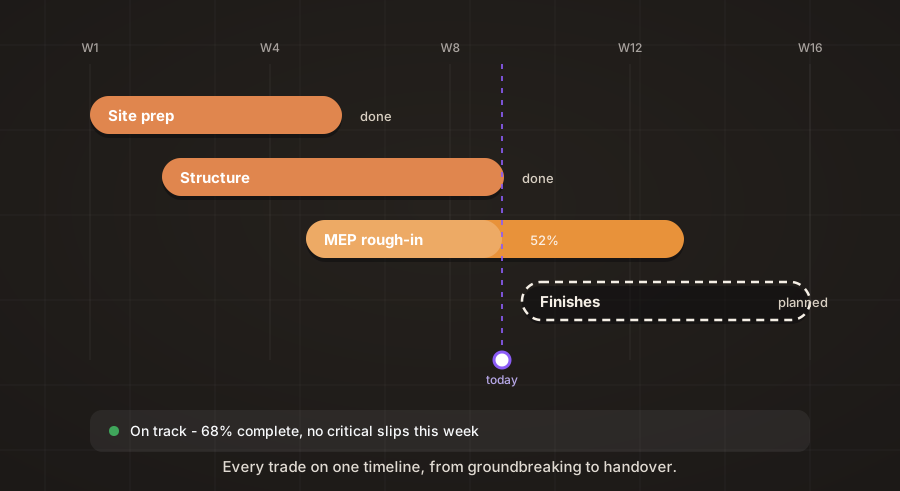
WBS + Gantt
Paste a plain-text outline and a live schedule builds itself. Dates cascade from predecessors, the critical path lights up in gold, and near-deadline tasks pulse amber.
Schedule
Kanban Board
Move cards To Do → In Progress → Done, with a dedicated lead-time lane for permits and procurement, plus sprint tools when you're running Agile.
Execution
RACI Matrix
Built live from your WBS and people lists. Click any cell to cycle R → A → C → I. No re-entry, no stale matrix.
Accountability
Risk + Monte Carlo
Log risks and issues, then run 1,000-trial simulations for real odds on your finish date. P50 and hit probability included.
Forecast
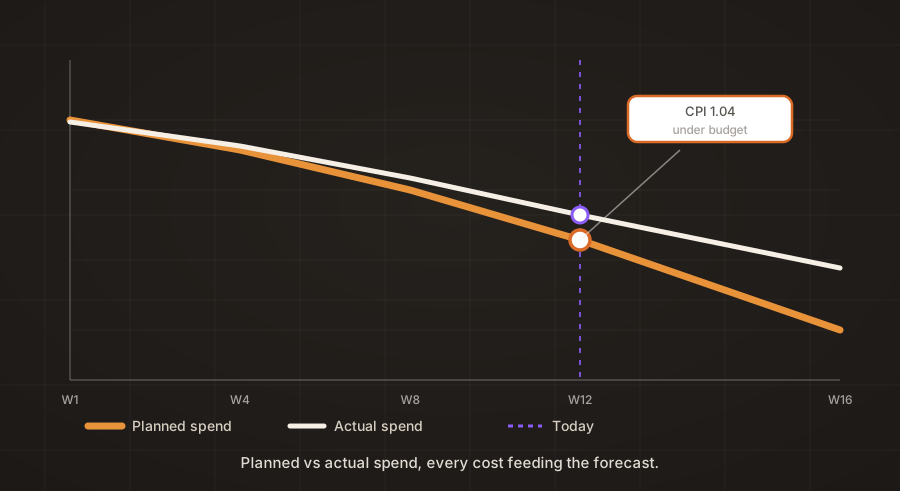
Budget / EVM
Budget lines and a spend log roll straight into an S-curve and earned-value metrics: SPI, CPI, EAC, TCPI, computed, not guessed.
Finance
My MaNaGeR AI, Not a Middleman
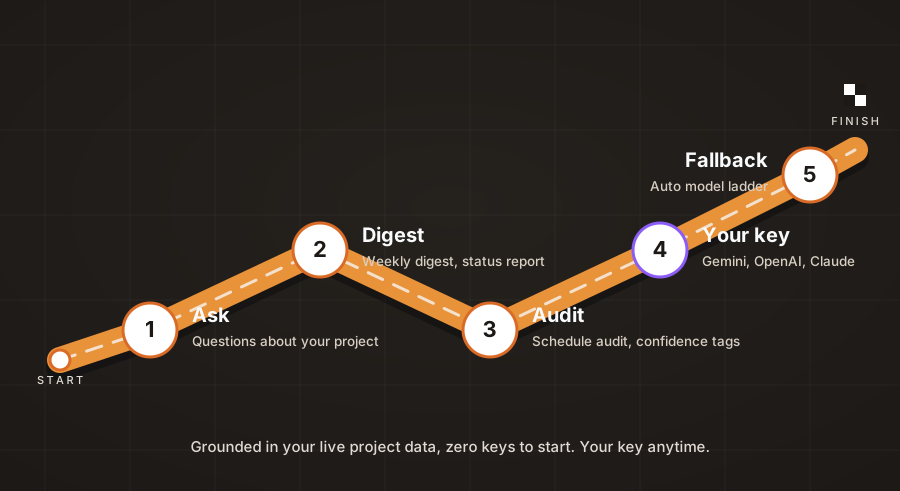
A real AI engine that runs in your browser with zero keys and zero cloud. Every answer traces to your actual project numbers, and one-click presets write digests, reports, and claim arguments straight back into the project.
Intelligence
Voice → Notes & Claims
Dictate a site meeting and it transcribes offline. Whisper runs in your browser, no cloud, no per-minute fee. A recorded dispute becomes a counsel-ready Claim Pack on the spot.
Field
Weather-Aware
Site forecasts and weather windows flag exposed tasks before the rain does, and a delay log keeps the record dispute-ready.
Field
Offline-First
Autosaves to your browser, exports a portable file, and never uploads a byte. Your data stays on your device, not someone's server.
Privacy
Health & Portfolio
A live health score across schedule, budget and risk on every project, and a portfolio view when you run more than one.
Overview
Meetings & Decisions
Run a meeting, log decisions in one tap, and turn minutes into follow-up actions that land straight in the schedule.
Collaboration
Claims & Digests
Weekly digests and counsel-ready claim packs generated from your live project numbers, every claim traceable to its evidence.
Intelligence
Registers & Compliance
RFIs, submittals, punch lists, COIs, permits and warranties, each with its own lifecycle and expiry tracking.
Governance
Bid Leveling & Go/No-Go
Level subcontractor bids line by line and score each opportunity with a weighted Go/No-Go questionnaire.
Procurement
Lookahead & Field Metrics
Two-week lookaheads, percent-plan-complete tracking, and weather windows that flag exposed tasks before the rain does.
Field
My MaNaGeR
One site, every phase
See the whole job from above.
What the crews build on site is exactly what your WBS, budget, and forecast are tracking, every number feeding every other.
No install, no account, no training course. Most teams are productive in their first fifteen minutes.
Pick your methodology
Choose Waterfall, Agile, or Hybrid, or run two at once. The workspace reorganizes around your choice.
Charter the project
Sponsor, stakeholders, scope, budget, KPIs. Paste an existing charter and let it auto-fill.
Build the WBS
Import a plain-text outline or add tasks by hand. Dates cascade automatically as the schedule moves.
Track, forecast, report
Health score, EVM, Monte Carlo, and copy-ready digests keep everyone aligned, from any panel.
An account is optional. Your data is not.
Every feature works with zero sign-in, forever. Signing in only unlocks convenience for backing up and moving between devices. We gate the backup, never the app.
Export AnytimeA portable .json opens on any device, signed in or not. It's the guaranteed way to move or back up a project.
Optional Google SyncSign in only if you want Drive backup and cross-device sync as a convenience. It never gates a feature.
Field-Level MergeEdit the same project on two devices and the newest write wins per field, never a whole-file last-save.
No Servers, EverLocal-first by design. A closed tab is fine. Export before anything that might wipe the browser.
My MaNaGeR
From rough-in to the final walkthrough.
Handoff-ready documentation, punch lists, and closeout, captured in the same workspace that ran the whole job.
No. My MaNaGeR runs entirely in your browser, with no install, no account, no subscription. Open the app and go.
How do I get access to a project?
Each project is protected by its own access code. Ask your admin for the code. A view-only code opens the project read-only.
Where is my data stored?
On your own device. Everything autosaves to your browser and you can export a portable file anytime. Nothing is uploaded anywhere.
Which browsers are supported?
Current versions of Chrome, Edge, Firefox, and Safari, on desktop and mobile.
How do I back up or move my project?
Open Settings ▸ Controls ▸ Save Project to File to export a portable .json. It's your ticket to a new device, a teammate's laptop, or just peace of mind. Load Project from File restores it anywhere. LocalStorage protects you from a closed tab; a saved file protects you from a wiped browser.
What is the methodology lock?
The app runs Waterfall, Agile, or Hybrid. Pick one, or run two at once. Once your team commits, lock it in from Settings ▸ Controls: a gold padlock appears in the header and the app blocks mid-project switching, the same discipline as a signed-off drawing set.
What is DMAIC?
An optional Six Sigma workflow for recurring quality or process problems. Define, Measure, Analyze, Improve, Control. It's separate from one-off change requests and you switch it on in Settings. Most projects never need it, so it stays hidden until you do.
Does it need an internet connection?
No. The app runs entirely in your browser and autosaves locally. The only things that need a connection are optional: live weather forecasts, and the first-time load of the libraries that parse an uploaded charter.